Redesigning Acer's Partner Portal and Product Catalog by Espresso Labs
How Espresso Labs redesigned Acer's partner portal: a product catalog with an admin panel that lets teams manage items without relying on developers.
The client
Acer is a Taiwanese multinational in the technology sector, specialized in hardware manufacturing and design, serving individual consumers, businesses, and organizations worldwide.
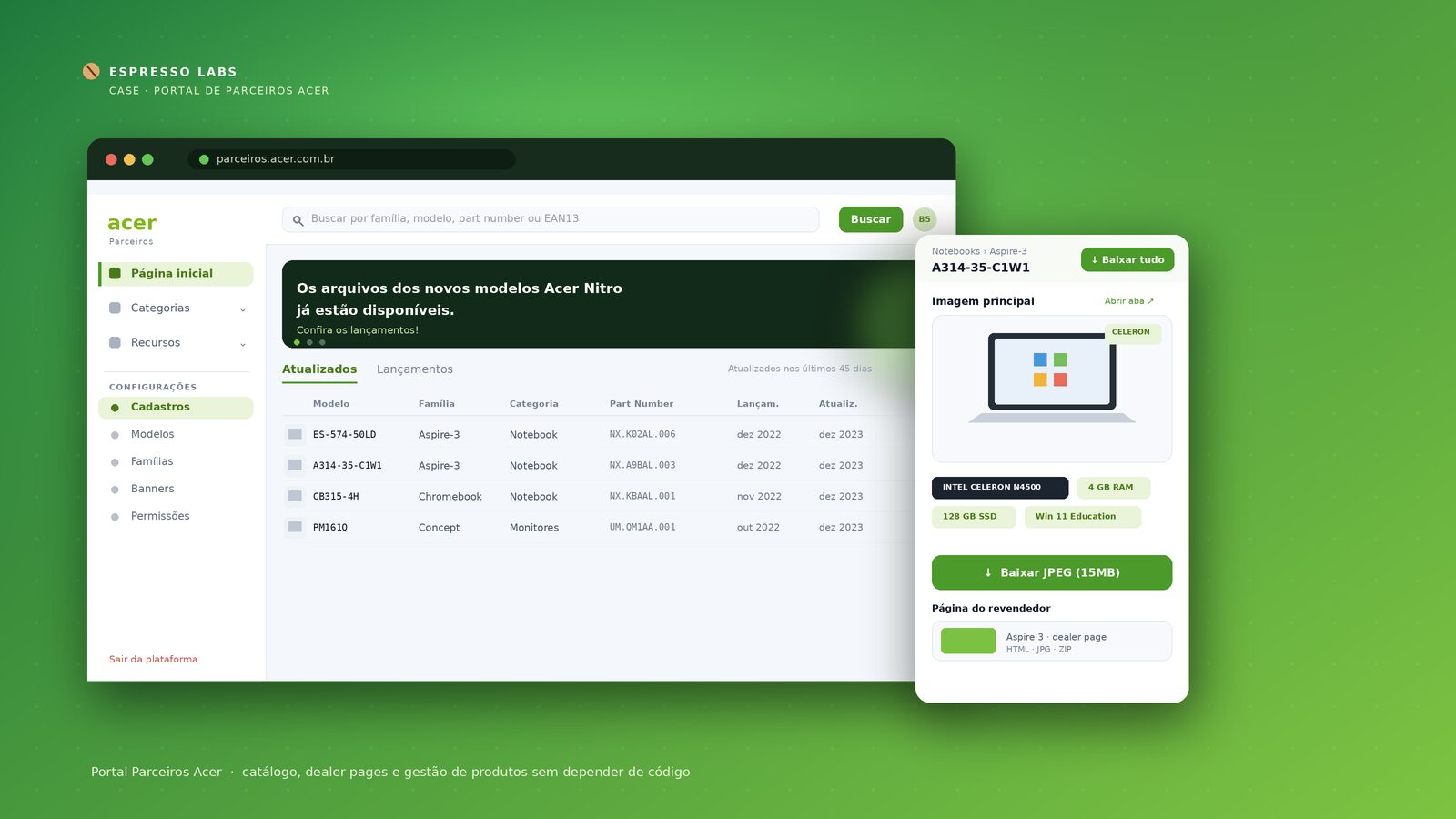
The Acer Partners Platform is a catalog that organizes information about the products the brand sells. It gathers each model's data, images, and materials and generates a front end (with dealer pages, guides, and image packs) that retailers can use directly in their online stores.
The challenge
Over time, the platform lost its way. What began as a centralized materials database evolved into a simplified mailing tool — and along the way, the platform's identity became diluted. The result was an experience with accumulated problems:
- Fragile usability: no error prevention, ambiguous titles, mixed languages, and no clear instructions.
- Broken navigation: on some top-bar links, users couldn't get back to the menu.
- Poor visual differentiation: listings without logos or thumbnails, unclear editing commands, and an empty dashboard with no purpose.
- No brand identity: the admin module had a completely different design from the portal and didn't reflect Acer.
- Code dependency: adding new catalog items required direct interaction with the code — meaning tech-team support for every change.
Espresso Labs' approach
The work started from a solid UX foundation: heuristic analysis (evaluating the interface against core design principles to detect usability issues) and prototyping (designing and validating screens before development). From there, the solution was delivered in two phases.
Phase 1 — Partner Portal
The redesign focused on making navigation intuitive for any partner:
- A side menu for quick access to sections and easy addition of new pages;
- A model page with the details that were missing: category, model, part number, launch date, last update date, and EAN13;
- Icon standardization for visual consistency across the platform;
- Advanced filtering in the catalog and a clear separation between Acer and partner resources;
- Error and state signaling, eliminating duplicate screens and ensuring information consistency.
Phase 2 — Admin Panel
We built a panel for internal collaborators and technology, communication, and marketing partners to register and manage the products and files made available to retailers. The goals:
- Simplify registration and management of products and resources, reducing registration/editing time compared to the previous system;
- A dealer-pages report to extract the number of pages generated;
- Bring Acer's identity to the module, which previously clashed with the portal;
- Integrate the main platform with the admin panel, giving a holistic view of the entire ecosystem.
What was delivered
The redesign turned a scattered platform into a cohesive, self-sufficient system:
- A more navigable catalog, with advanced filters and optimized categories and terms;
- Information consistency, with error signaling and no more duplicate screens;
- Management without code dependency: adding catalog items no longer requires direct interaction with the code or tech-team support — the capability now lives in the platform itself;
- An integrated ecosystem: portal and admin panel unified, with brand identity and a single end-to-end view.
The Acer partner solution, finally, in one place.
Why it matters
Platforms that grow without direction accumulate usability debt and end up throttling their own operation. The biggest value of this project wasn't just aesthetic: by removing the code bottleneck, Acer gained the autonomy to update its catalog quickly — the tech team was no longer a mandatory intermediary for every change.
Frequently asked questions
What is the Acer Partners Platform? It is a product catalog that centralizes the information and assets of the items Acer sells and generates a front end (with dealer pages, guides, and images) that retailers can use in their own online stores.
What did Espresso Labs do in the project? It led the UX redesign across two phases — the Partner Portal and a new Admin Panel — based on heuristic analysis and prototyping, standardizing the interface, improving navigation, and integrating the two modules.
What was the main gain for Acer? Reducing catalog-management complexity and time: adding and editing items no longer required direct interaction with the code or tech-team support.
What is the Admin Panel? It is the module where internal collaborators and partners register and manage products and files, integrated with the main platform and aligned with Acer's identity.
What is heuristic analysis? It is a method of evaluating interfaces that applies core design principles to detect usability problems before development.
One ecosystem in a single place
We worked on an accessible, efficient redesign for partners to navigate products, and integrated the main platform with the admin panel — making management easier and giving a holistic view of the entire Acer ecosystem.
Have a similar idea?
Send us a message, we will help you find the best way to bring it to reality